

Growing an Instagram account is fun, but managing it every single day can quickly become overwhelming. If you are constantly stressing about what to post today, or spending hours replying to comments and DMs, you are doing it wrong.
Professional creators and social media managers do not spend 10 hours a day on Instagram. They use smart strategies and tools to automate their work.
If you want to treat your Instagram like a real business, here is how you can manage your account professionally and save hours of your time every week.
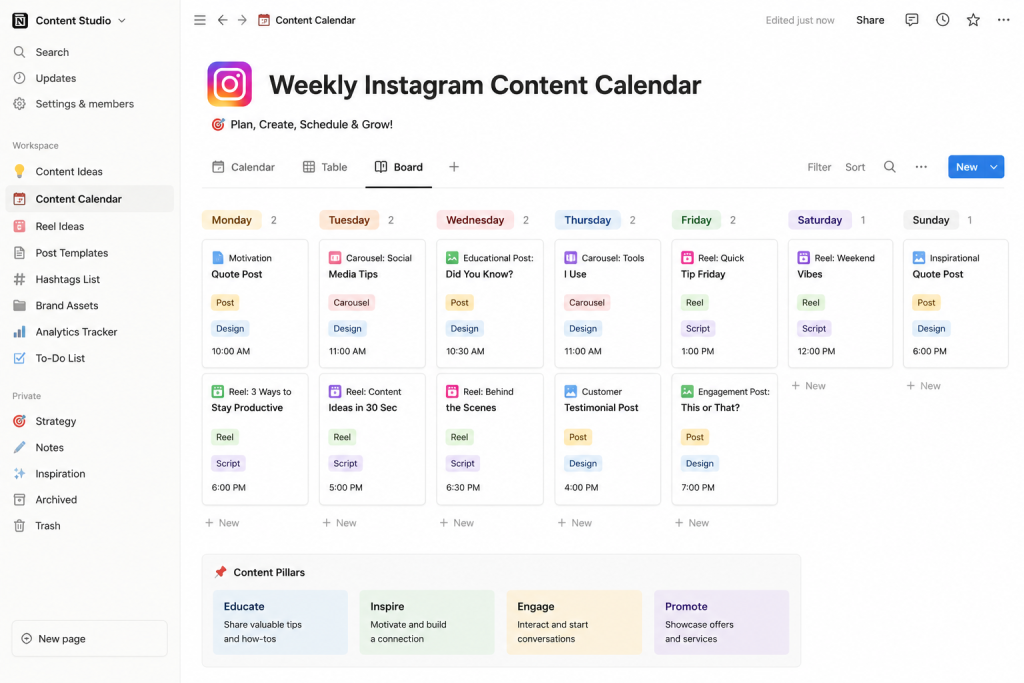
1. Create a Content Calendar (Batch Creation)
The biggest mistake beginners make is waking up and thinking, “What should I post today?” Professional accounts plan their content weeks in advance.
- Batching: Instead of creating one Reel every day, pick one day of the week (like Sunday) and film 5 to 7 Reels all at once. Edit them in one sitting.
- Use a Calendar: Use free tools like Google Sheets, Notion, or Trello to plan exactly what will be posted on which day. This keeps your feed consistent and completely removes the daily stress of content creation.
2. Schedule Your Posts in Advance
You do not need to be physically holding your phone to post a picture at 6 PM. You can automate this entirely!
- Meta Business Suite: Since Instagram is owned by Meta, you can use the free Meta Business Suite on your computer to schedule your posts, Carousels, and Reels days or even months in advance.
- Third-Party Tools: If you want more advanced features, you can use scheduling tools like Later, Buffer, or Hootsuite.
By scheduling your posts, you ensure that your content goes live at the exact time your audience is most active, even if you are sleeping or busy with other work.
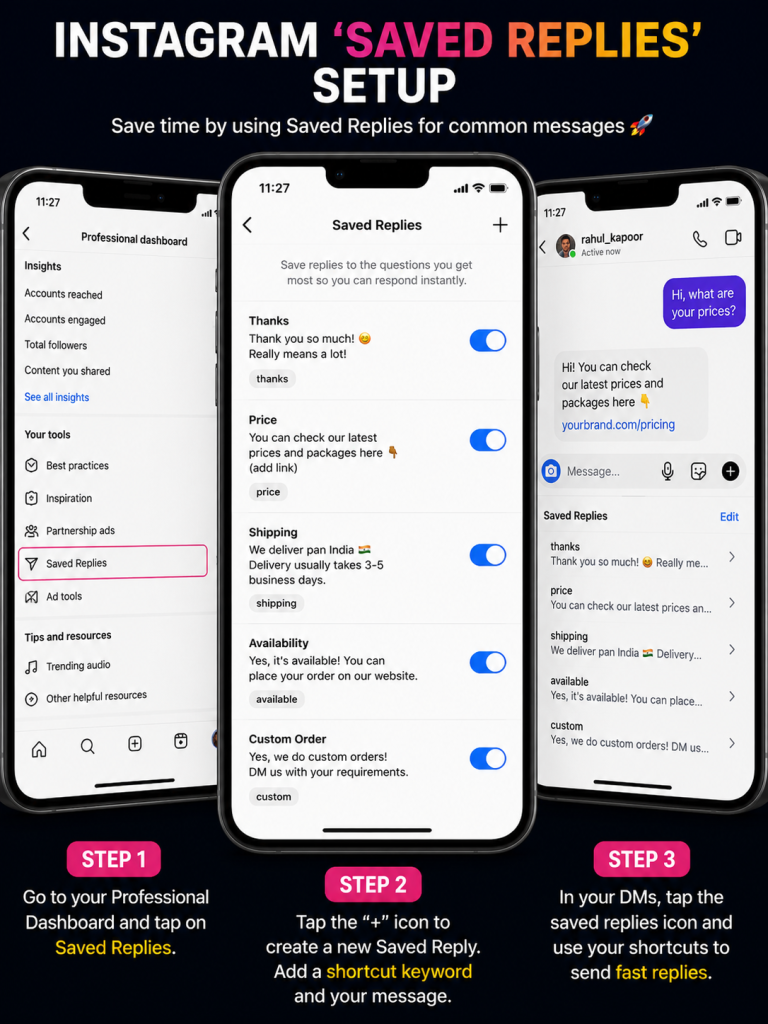
3. Set Up “Saved Replies” for DMs
As your account grows, you will start getting the same questions over and over again in your Direct Messages (e.g., “What is the link to this product?”, “How much do you charge?”, “What gear do you use?”).
If you have an Instagram Professional or Business account, you can create Saved Replies.
- Go to your Settings > Business/Creator > Saved Replies.
- Create a shortcut (like “link”) and type out the full message.
- Next time someone asks, you just type the shortcut, and the full message appears! This saves a massive amount of typing time.
4. Track Your Analytics Weekly
Professional management means making decisions based on data, not just feelings. You need to know what is working and what is failing.
- Dedicate 15 minutes every week to look at your Instagram Insights.
- Look at which posts got the most Saves and Shares.
- Check your audience demographics (what time they are active, their age, and their location).
- Once you find a format that works (for example, lists or educational carousels), double down on it and make more of that specific type of content.
5. Optimize Your Engagement Strategy
You cannot ignore your followers, but you also cannot spend all day replying to comments.
- Time-Blocking: Dedicate just 30 minutes a day specifically for engagement. Spend 15 minutes replying to comments on your own posts, and 15 minutes leaving valuable comments on other accounts in your niche.
- Once the 30 minutes are over, close the app. This keeps your engagement high but prevents endless scrolling.
Conclusion
Managing an Instagram account professionally is all about working smarter, not harder. By batching your content, scheduling posts, automating your DMs, and tracking your analytics, you can run a highly successful account in just a few hours a week.
What is your favorite tool for managing your Instagram? Let us know in the comments below!

admin Verified Specialist
Editorial Contributor and industry enthusiast specializing in digital strategies and online analytics.